
v11 文档
这是 Vue I18n v11 的文档。如果您使用的是 v12 或更高版本,请参阅 最新指南。
TypeScript 支持
支持的版本
🆕 9.2+
VueI18n 使用资源,即语言环境消息、日期时间格式和数字格式。 特别是,语言环境消息可以外部化为 i18n 资源,例如 json 文件,以便与使用本地化服务的翻译人员进行协作,并且可以导入这些资源进行协作。
为了实现与本地化服务结合的顺畅本地化工作流程,你可能希望防止外部化 i18n 资源的本地化缺失或资源定义缺失。 在开发中,你可能不希望通过防止在使用 $t 等翻译函数时的键字符串错误来破坏开发人员的体验。
使用架构的类型安全资源
你可以使用 TypeScript 支持具有资源架构的类型安全资源。
createI18n 中的类型安全资源
以下是为使用 createI18n 选项定义的 messages 定义类型安全资源的示例代码。
语言环境消息资源:
{
  "world": "the world!"
}
应用程序入口点:
import { createI18n } from 'vue-i18n'
import enUS from './locales/en-US.json'

// 将 'en-US' 类型定义为资源的主架构
type MessageSchema = typeof enUS

const i18n = createI18n<[MessageSchema], 'en-US' | 'ja-JP'>({
  locale: 'en-US',
  messages: {
    'en-US': enUS
  }
})
上面的代码从 createI18n 的 messages 选项中指定的 en-US 消息资源定义了一个类型。这个定义的类型是用 VueI18n 处理的消息资源的类似主架构。这意味着你可以在应用程序中将其定义为 单一事实来源 资源。你可以通过将定义为消息资源架构的类型指定为 createI18n 的类型参数的第一个参数,在其他区域设置中定义类型安全资源。
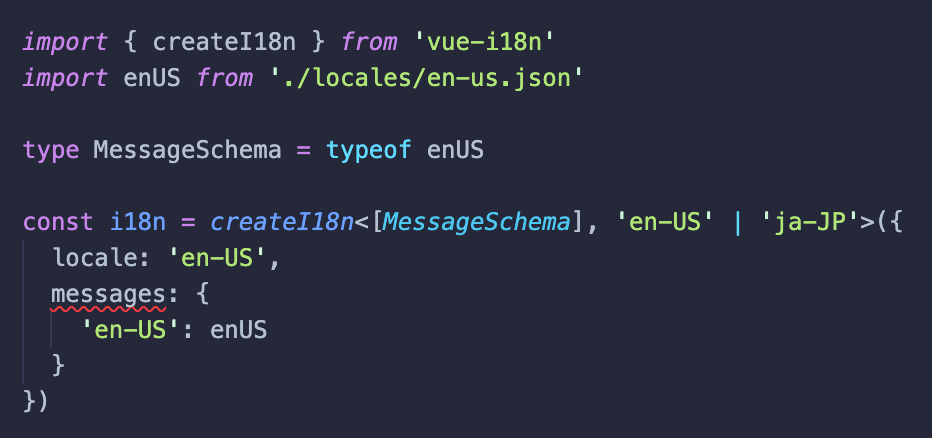
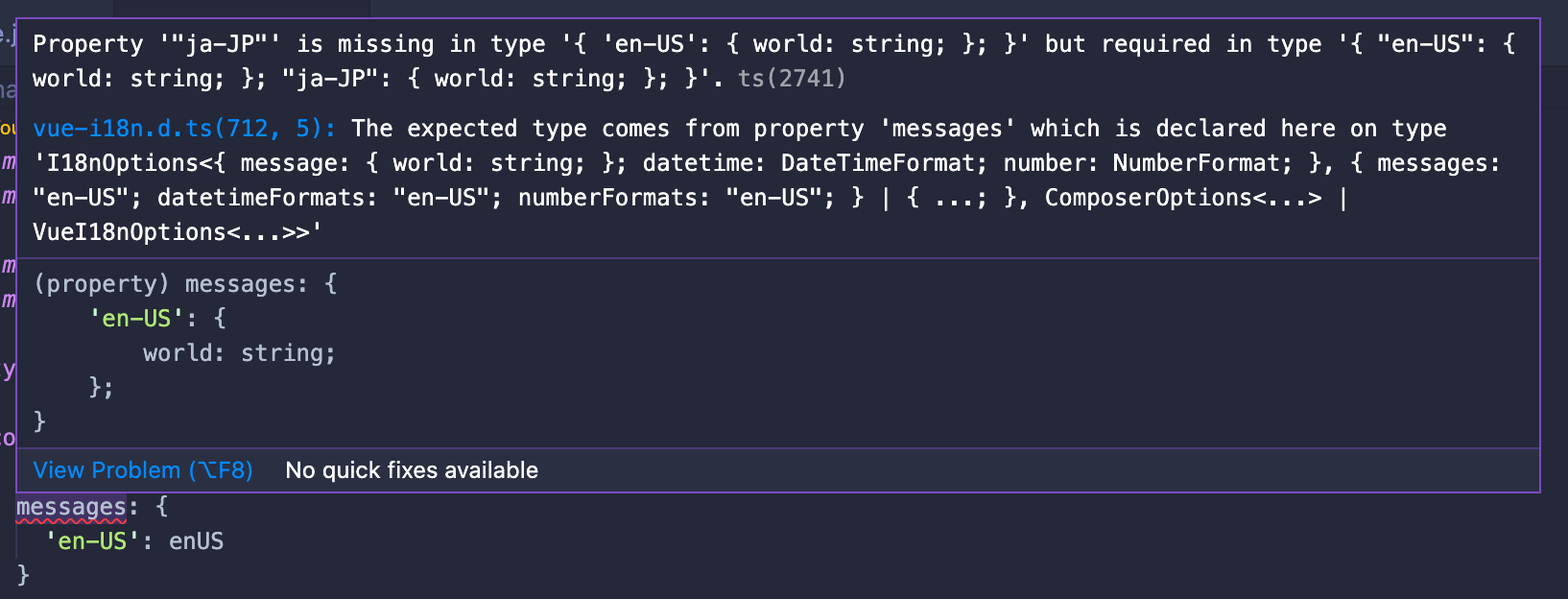
createI18n 的类型参数的第二个参数是要处理的区域设置。这样,将根据第一个参数中指定的资源类型,对第二个参数中指定的每个区域设置执行类型检查。在上面的代码示例中,en-US 和 ja-JP 被指定为主要区域设置,这也指定在 locale 选项中。如果你在此状态下编译 typescript,你将收到以下错误,以检查 messages 选项中是否未定义 ja-JP 资源。
$ npx tsc
npx tsc
src/main.ts:11:3 - error TS2741: Property '"ja-JP"' is missing in type '{ 'en-US': { world: string; }; }' but required in type '{ "en-US": { world: string; }; "ja-JP": { world: string; }; }'.

11   messages: {
     ~~~~~~~~

  node_modules/vue-i18n/dist/vue-i18n.d.ts:712:5
    712     messages?: {
            ~~~~~~~~
    The expected type comes from property 'messages' which is declared here on type 'I18nOptions<{ message: { world: string; }; datetime: DateTimeFormat; number: NumberFormat; }, { messages: "en-US"; datetimeFormats: "en-US"; numberFormats: "en-US"; } | { ...; }, ComposerOptions<...> | VueI18nOptions<...>>'


Found 1 error.
如果你使用 Visual Studio Code 作为编辑器,你可以在运行 typescript 编译之前通过以下错误注意到编辑器中存在资源定义遗漏。
useI18n 中的类型安全资源
不仅可以使用 createI18n 定义类型安全资源,还可以使用与组合式 API 一起使用的 useI18n 在每个组件的基础上定义类型安全资源。
除了本地消息外,资源类型定义还可以包括日期时间格式和数字格式。
以下是在 useI18n 中按组件定义语言环境消息和数字格式的类型安全资源的示例代码。
在 Vue 组件中导入的语言环境消息:
{
  "messages": {
    "hello": "Hello, {name}!"
  }
}
具有类型安全资源的 Vue 组件:
<script setup lang="ts">
import { useI18n } from 'vue-i18n'
import enUS from './en-US.json' // 为 Vue 组件导入语言环境消息

// 为 Vue 组件定义消息架构
type MessageSchema = typeof enUS

// 为 Vue 组件定义数字格式架构
type NumberSchema = {
  currency: {
    style: 'currency'
    currencyDisplay: 'symbol'
    currency: string
  }
}

/*
 * 你可以在第一个类型参数中使用对象字面量指定你的定义架构
 * 关于类型参数,请参阅 http://vue-i18n.intlify.dev/api/composition.html#usei18n
 */
const { t, n } = useI18n<{
  message: MessageSchema,
  number: NumberSchema
}, 'en-US'>({
  inheritLocale: true,
  messages: {
    'en-US': enUS
  },
  numberFormats: {
    'en-US': {
      currency: {
        style: 'currency',
        currencyDisplay: 'symbol',
        currency: 'USD'
      }
    }
  }
})
</script>

<template>
  <p>message: {{ t('messages.hello', { name: 'kazupon' }) }}</p>
  <p>currency: {{ n(1000, 'currency') }}</p>
</template>
上面的代码,通过将定义的架构指定为 useI18n 的第一个类型参数,你可以使用 TypeScript 检查语言环境消息和数字格式的未定义资源。此外,通过在第二个类型参数中指定要定义的区域设置,TypeScript 可以检查未定义的区域设置。
限制
- SFC 中的 i18n 自定义块不支持类型安全。我们计划在未来支持它。
- 目前仅支持
JSON格式。
到目前为止描述的代码可作为 示例 提供。让我们检查一下!
类型安全支持 API
其他 API 支持类型参数,允许你指定用于类型安全资源操作的资源架构,例如:
getLocaleMessagesetLocaleMessagemergeLocaleMessagegetDateTimeFormatsetDateTimeFormatmergeDateTimeFormatgetNumberFormatsetNumberFormatmergeNumberFormat
有关更多详细信息,请查看以下 API 文档页面。
资源键补全支持
注意
如果你使用 Visual Studio Code,则可以使用资源键补全
随着对类型安全资源定义的支持,VueI18n 现在提供了诸如 t 和 d 之类的 API,用于在组合式 API 中插入资源键。
以下显示了如何在 Visual Studio Code 中为上述本地作用域 Vue 组件插入资源键。
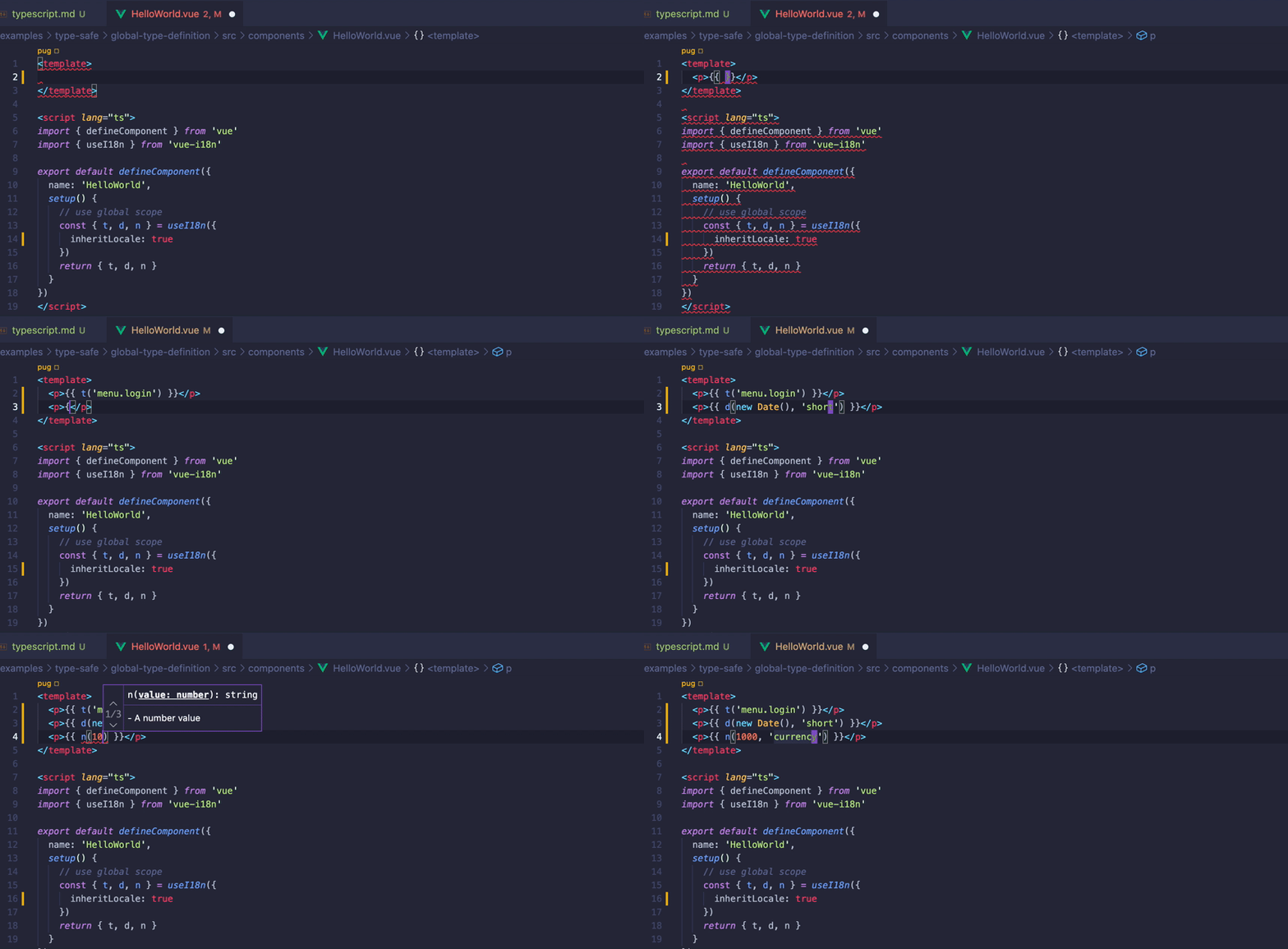
支持资源键的插值可以防止翻译缺失。
在你的项目上的用例,你可能有不使用本地作用域但对所有内容使用全局作用域的 Vue 组件。
对于该用例,你还可以通过在 useI18n 的类型参数中显式指定为全局作用域定义的架构来支持资源键的插值。
定义全局作用域的架构:
/**
 * 定义资源架构
 */

import enUS from './en-US.json'

// 将消息架构定义为主消息架构
export type MessageSchema = typeof enUS

// 定义数字格式架构
export type NumberSchema = {
  currency: {
    style: 'currency'
    currencyDisplay: 'symbol'
    currency: string
  }
}
然后,只需导入定义的架构并将其用作 useI18n 的类型参数,如下面的 Vue 组件所示:
<script lang="ts">
import { useI18n } from 'vue-i18n'

// 导入全局作用域的资源架构
import type { MessageSchema, NumberSchema } from '../locales/schema'

const { t, n } = useI18n<{ message: MessageSchema, number: NumberSchema }>({
  useScope: 'global'
})
</script>

<template>
  <p>message: {{ t('hello') }}</p>
  <p>currency: {{ n(1000, 'currency') }}</p>
</template>
因此,你可以在 VueI18n 提供的 API(如 t 和 n)中使用资源键的插值。
注意
传统模式,以及通过组合式 API 的 globalInjection: true 注入到组件中的 API(如 $t 和 $d)的资源键插值,需要显式指定类型参数。
有关更多详细信息,请参阅 API 文档。 https://vue-i18n.intlify.dev/api/injection.html
全局资源架构类型定义
在 VueI18n 中,你可以通过使用 TypeScript 功能扩展接口来在全局作用域级别定义资源类型。
如果你的项目将所有资源用作全局作用域,那么轻松处理类型安全资源非常方便。
VueI18n 提供以下接口:
DefineLocaleMessage: 全局定义语言环境消息架构的接口DefineDateTimeFormat: 全局定义日期时间格式架构的接口DefineNumberFormat: 全局定义数字格式架构的接口
通过使用这些接口和 declare module,你可以为 VueI18n 定义全局架构。
以下是在 d.ts 中定义的全局架构示例:
/**
 * 你需要导入一些接口
 */


declare module 'vue-i18n' {
  // 定义语言环境消息架构
  export interface DefineLocaleMessage {
    hello: string
    menu: {
      login: string
    }
    errors: string[]
  }

  // 定义日期时间格式架构
  export interface DefineDateTimeFormat {
    short: {
      hour: 'numeric'
      minute: 'numeric'
      second: 'numeric'
      timeZoneName: 'short'
      timezone: string
    }
  }

  // 定义数字格式架构
  export interface DefineNumberFormat {
    currency: {
      style: 'currency'
      currencyDisplay: 'symbol'
      currency: string
    }
  }
}
通过使用 declare module 和 VueI18n 提供的接口,你可以定义全局资源的架构。
以前,当使用 createI18n 和 useI18n 以及全局作用域资源的类型定义时,必须将每个指定为类型参数。 这样,你就不需要这样做了。
以下是使用 createI18n 的示例:
import { createI18n, type I18nOptions } from 'vue-i18n'

/**
 * 从 json 导入全局作用域的语言环境消息资源
 */
import enUS from './locales/en-US.json'
import jaJP from './locales/ja-JP.json'

const options: I18nOptions = {
  legacy: false,
  locale: 'ja-JP',
  fallbackLocale: 'en-US',
  messages: {
    'en-US': enUS,
    'ja-JP': jaJP
  },
  datetimeFormats: {
    'ja-JP': {
      short: {
        hour: 'numeric',
        minute: 'numeric',
        second: 'numeric',
        timeZoneName: 'short',
        timezone: 'Asia/Tokyo'
      }
    }
  },
  numberFormats: {
    'ja-JP': {
      currency: {
        style: 'currency',
        currencyDisplay: 'symbol',
        currency: 'JPY'
      }
    }
  }
}

/**
 * 使用具有全局类型定义的 i18n 资源设置 vue-i18n。
 * 如果你在 `*.d.ts` 中定义了 i18n 资源架构,这些将通过 typeScript 进行检查。
 */
const i18n = createI18n<false, typeof options>(options)
上面 createI18n 的第一个类型参数不指定作为资源架构的类型。上面只是为 createI18n 创建的 i18n 实例的 global 属性指定类型提示。 (如果为 false,则类型为组合式 API 的 Composer 实例,如果为 true,则类型为传统 API 的 VueI18n 实例)
createI18n 的第二个类型参数指定选项的类型提示。
在 Vue 组件使用 useI18n 的情况下,它看起来像这样:
<script setup lang="ts">
import { useI18n } from 'vue-i18n'

// 使用全局作用域
const { t, d, n } = useI18n({
  inheritLocale: true
})
</script>

<template>
  <p>`t` resource key completion: {{ t('menu.login') }}</p>
  <p>`d` resource key completion: {{ d(new Date(), 'short') }}</p>
  <p>`n` resource key completion: {{ n(1000, 'currency') }}</p>
</template>
从上面的代码可以看出,你不需要为 useI18n 的类型参数指定任何内容。你可以在不指定它们的情况下插入 API 资源键,例如 t、d 和 n。