
Scope and Locale Changing
Scope
Vue I18n manages resources to offer i18n features, including locale switching, each language messages called locales messages, and named format for datetime and numbers. They are managed with the Composer instance.
The Vue application is built from some components on the tree structure. To localize each of components in Vue I18n using the i18n features, we need to understand the concept of scope.
Vue I18n has two scopes the below:
- global scope
- local scope
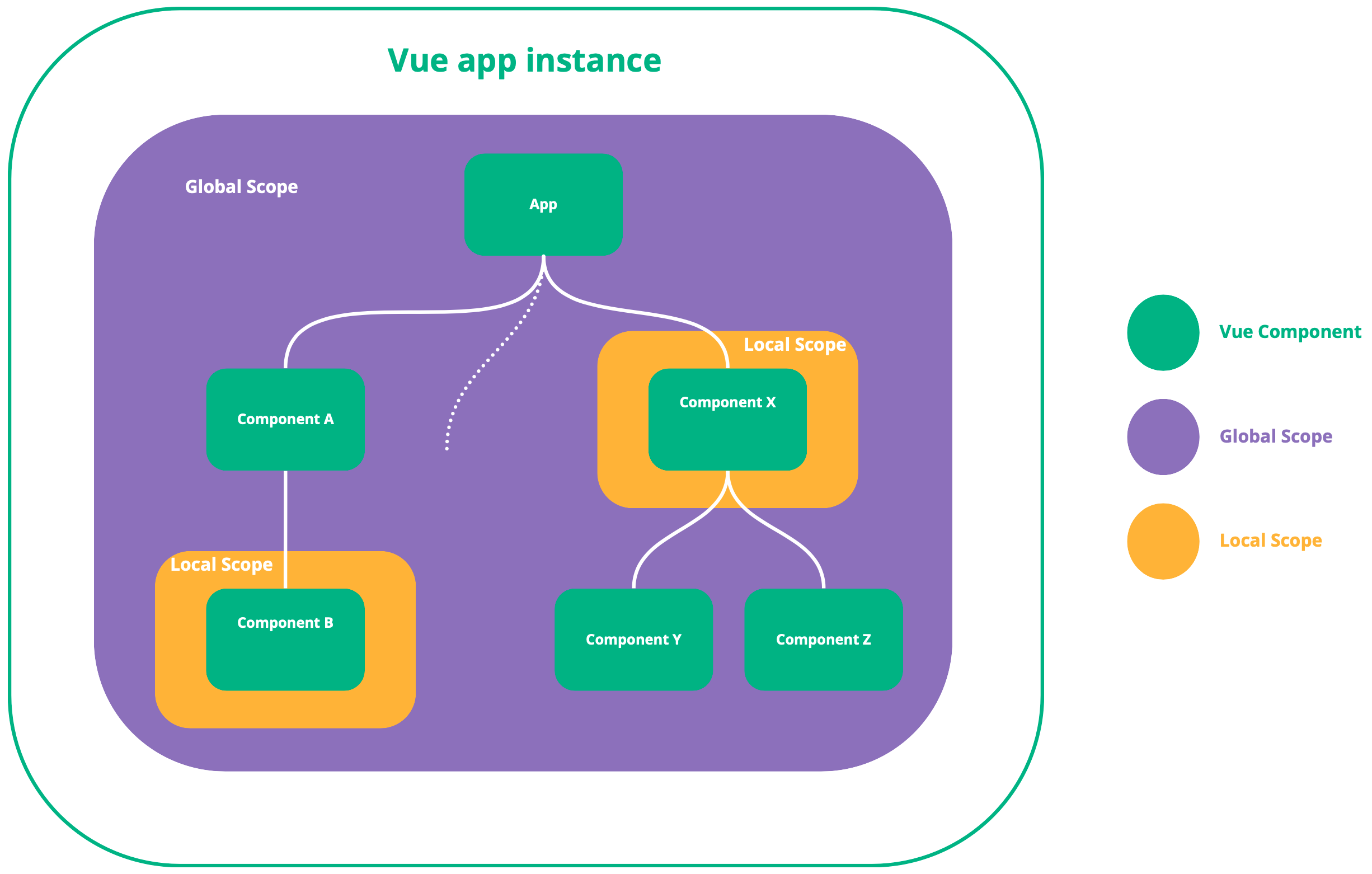
Global Scope
The global scope in Vue allows you to access and manage internationalization (i18n) resources across all components in your application. This is especially useful for centralizing i18n management.
When you create an i18n instance using createI18n, a global scope is automatically created. This global scope is tied to the Composer instance, which can be accessed through the global property of the i18n instance.
If local messages are not specified via useI18n(), the global scope is used. The Composer instance returned by useI18n() refers to the global Composer when no local messages are provided.
Local Scope
The local scope in Vue allows you to manage i18n resources on a per-component basis, similar to how <style scoped> works in single-file components. When a component has a local scope, only that component's i18n resources are active. This is particularly useful when you want to manage locale messages specific to each component.
Local scope is enabled by specifying messages in useI18n() or by using an <i18n> custom block in the SFC. This creates a new Composer instance when the component is initialized. As a result, the Composer instance returned by useI18n() in that component is distinct from the global Composer instance.
Locale Changing
So far, we've explained the concept of the scope, and once you understand the scope, it's easy to understand how to change the locale.
Global Scope
If you want to change the locale for the whole application, you can use useI18n() to access the global locale.
Here's an example:
const i18n = createI18n({
  locale: 'ja', // set current locale
  messages: {
    en: {
      hello: 'hello!'
    },
    ja: {
      hello: 'こんにちは!'
    }
  },
  // vue-i18n something options here ...
  // ...
})

// create Vue app instance, install Vue I18n, and mount!
createApp(App).use(i18n).mount('#app')
Component:
<script setup>
import { useI18n } from 'vue-i18n'

const { locale, availableLocales } = useI18n()
</script>

<template>
  <div class="locale-changer">
    <select v-model="locale">
      <option
        v-for="loc in availableLocales"
        :key="`locale-${loc}`"
        :value="loc"
      >
        {{ loc }}
      </option>
    </select>
  </div>
</template>
NOTE
$i18n.locale is also available in templates via global injection. It provides access to locale, fallbackLocale, and availableLocales. See the v12 Breaking Changes for details on the $i18n property.
The above example uses availableLocales from useI18n() to list the available locales as options for the select element. Since locale is a writable computed ref, you can switch it by selecting the option.
As you can see, the global scope is very useful because it allows you to switch the messages displayed in the UI for all components of the application at once.
Local Scope
locale of local scope is inherited from global Scope by default. Therefore, when you change the locale in global scope, the locale in local scope is also changed.
If you want to switch the locale for the whole application, you need to change it via global property of i18n instance created with createI18n.
NOTE
If you don't want to inherit locale from global scope, you need to set inheritLocale: false in useI18n() options.
Example:
const i18n = createI18n({
  locale: 'ja', // set current locale
  // vue-i18n something options here ...
  // ...
})

// create Vue app instance, install Vue I18n, and mount!
createApp(App).use(i18n).mount('#app')

// change locale via `global` property
// i18n.global.locale is a ref, so set it via .value:
i18n.global.locale.value = 'en'
NOTICE
Changing locale of local scope does not affect locale of global scope. This means that changing the locale in a local scope component will not change the entire application's locale. Use useI18n({ useScope: 'global' }) or access i18n.global.locale.value to change the global locale.